I’m trying out XFCE on Arch Linux, and for some reason the Lock Screen option in the session menu doesn’t do anything. Neither does running xflock4 at the command line (it exits 0 with no output).
xfce4-session is running.
Do I need to install a screensaver package or something?
Answers:
Thank you for visiting the Q&A section on Magenaut. Please note that all the answers may not help you solve the issue immediately. So please treat them as advisements. If you found the post helpful (or not), leave a comment & I’ll get back to you as soon as possible.
Method 1
Do I need to install a screensaver package or something?
Yes, according to the wiki, you need to choose and install a locker. xflock4 will then activate it.
Method 2
First install light-locker.
$ xfconf-query -c xfce4-session -p /general/LockCommand -s "light-locker-command -l"
or if you don’t have the variable yet:
$ xfconf-query -c xfce4-session -p /general/LockCommand -s "light-locker-command -l" --create -t string
Old stuff:
Looks like xflock4 does support external config now. What I did is:
$ xfconf-query -c xfce4-session -p /general/LockCommand -s "dm-tool lock"
Now that command is used for locking. I guess gnome-screen-saver broke on upgrade.
This is for XFCE. If you don’t have that property already, you add it by:
$ xfconf-query -c xfce4-session -p /general/LockCommand -s "dm-tool lock" --create -t string
VERY IMPORTANT: you need a screensaver running to securely lock your screen. light-locker is one choice. At the end make sure switching consoles with ctrl+alt+F1 or some other F# does not let you circumvent the lock screen. See:
- https://bugs.launchpad.net/ubuntu/+source/lxsession/+bug/1205384
- https://bugzilla.redhat.com/show_bug.cgi?id=1300178
Method 3
Edit /usr/bin/xflock4 and append light-locker-command -l or dm-tool lock to the list.
for lock_cmd in
"xscreensaver-command -lock"
"gnome-screensaver-command --lock"
"light-locker-command -l"
"dm-tool lock"
Method 4
Case_of’s answer was close for me, but dm-tool was already listed in my
/usr/local/bin/xflock4. But it tried xscreensaver-command and gnome-screensaver-command first. I moved those to the second for loop, and moved dm-tool up as the only option at first (removing the first for loop):
dm-tool lock >/dev/null 4>&1 && exit

# else run another access locking utility, if installed
for lock_cmd in
  "xscreensaver-command -lock"
  "gnome-screensaver-command --lock"
  "xlock -mode blank"
  "slock"
  do
    set -- $lock_cmd
    if command -v -- $1 >/dev/null 2>&1; then
        $lock_cmd >/dev/null 2>&1 &
    # turn off display backlight:
    xset dpms force off
        exit
    fi
done
I also mapped it to Win+L, to be like Windows.
Method 5
/usr/bin/xscreensaver was not running. Fixed by opening xfce4-settings-manager, opening screen saver section, it asked to run xscreensaver daemon, clicked yes and the locking works now.
Method 6
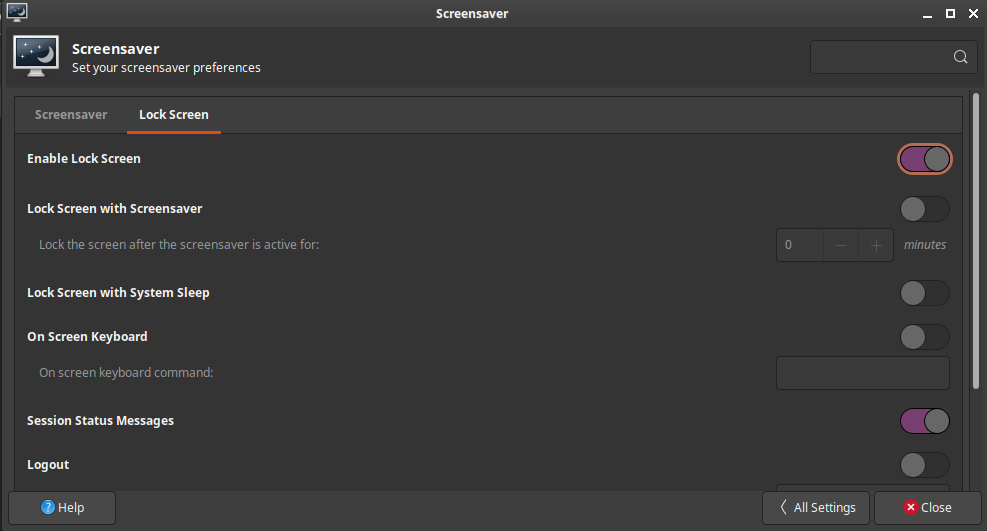
I had this problem and resolved it when I turned on Lock Screen in Settings>Screensaver>Lock Screen
Method 7
I just (January 2018) tried to get screen locking working under XFCE. I’m a little surprised it didn’t work by default. I initially tried to install light-locker and xscreensaver but neither worked.
What worked for me was to install the xlockmore package which provided /usr/bin/xlock which seems to work great. With that command now installed, I was able to configure the xfce session to use it:
xfconf-query -c xfce4-session -p /general/LockCommand -s "xlock"
or if you don’t have the variable yet:
xfconf-query -c xfce4-session -p /general/LockCommand -s "xlock" --create -t string
My /usr/bin/xflock4 script already pays attention to that LockCommand setting so there was no need to edit the script once I had the setting applied.
Xlock has a ton of different modes and settings which, by default, it randomizes through. I settled on:
xlock -mode goop -erasedelay 0
To test them use:
xlock -mode ... -nolock
Method 8
You can also use loginctl to lock the system.
in order to lock the screen you can simply do :
loginctl lock-session
You can selectively lock a specific session by providing a session id
loginctl lock-session sid
you can check the documentation for more information
Method 9
Really weird, but
xscreensaver-command --lock
worked after enabled on the Screensaver preferences (GUI of Xscreensaver) the option “Lock screen after”, and edit keyboard lock shortcut to the command above
obs: Ubuntu 20.04.2 LTS with xfce4 4.14
All methods was sourced from stackoverflow.com or stackexchange.com, is licensed under cc by-sa 2.5, cc by-sa 3.0 and cc by-sa 4.0