At work, I write bash scripts frequently. My supervisor has suggested that the entire script be broken into functions, similar to the following example:
#!/bin/bash

# Configure variables
declare_variables() {
    noun=geese
    count=three
}

# Announce something
i_am_foo() {
    echo "I am foo"
    sleep 0.5
    echo "hear me roar!"
}

# Tell a joke
walk_into_bar() {
    echo "So these ${count} ${noun} walk into a bar..."
}

# Emulate a pendulum clock for a bit
do_baz() {
    for i in {1..6}; do
        expr $i % 2 >/dev/null && echo "tick" || echo "tock"
        sleep 1
    done
}

# Establish run order
main() {
    declare_variables
    i_am_foo
    walk_into_bar
    do_baz
}

main
Is there any reason to do this other than “readability”, which I think could be equally well established with a few more comments and some line spacing?
Does it make the script run more efficiently (I would actually expect the opposite, if anything), or does it make it easier to modify the code beyond the aforementioned readability potential? Or is it really just a stylistic preference?
Please note that although the script doesn’t demonstrate it well, the “run order” of the functions in our actual scripts tends to be very linear — walk_into_bar depends on stuff that i_am_foo has done, and do_baz acts on stuff set up by walk_into_bar — so being able to arbitrarily swap the run order isn’t something we would generally be doing. For example, you wouldn’t suddenly want to put declare_variables after walk_into_bar, that would break things.
An example of how I would write the above script would be:
#!/bin/bash

# Configure variables
noun=geese
count=three

# Announce something
echo "I am foo"
sleep 0.5
echo "hear me roar!"

# Tell a joke
echo "So these ${count} ${noun} walk into a bar..."

# Emulate a pendulum clock for a bit
for i in {1..6}; do
    expr $i % 2 >/dev/null && echo "tick" || echo "tock"
    sleep 1
done
Answers:
Thank you for visiting the Q&A section on Magenaut. Please note that all the answers may not help you solve the issue immediately. So please treat them as advisements. If you found the post helpful (or not), leave a comment & I’ll get back to you as soon as possible.
Method 1
Readability is one thing. But there is more to modularisation than just this. (Semi-modularisation is maybe more correct for functions.)
In functions you can keep some variables local, which increases reliability, decreasing the chance of things getting messed up.
Another pro of functions is re-usability. Once a function is coded, it can be applied multiple times in the script. You can also port it to another script.
Your code now may be linear, but in the future you may enter the realm of multi-threading, or multi-processing in the Bash world. Once you learn to do things in functions, you will be well equipped for the step into the parallel.
One more point to add. As Etsitpab Nioliv notices in the comment below, it’s easy to redirect from functions as a coherent entity. But there’s one more aspect of redirections with functions. Namely, the redirections can be set along the function definition. Eg.:
f () { echo something; } > log
Now no explicit redirections are needed by the function calls.
$ f
This may spare many repetitions, which again increases reliability and helps keeping things in order.
See also
Method 2
I’ve started using this same style of bash programming after reading Kfir Lavi’s blog post “Defensive Bash Programming”. He gives quite a few good reasons, but personally I find these the most important:
-
procedures become descriptive: it’s much easier to figure out what a particular part of code is supposed to do. Instead of wall of code, you see “Oh, the
find_log_errorsfunction reads that log file for errors “. Compare it with finding whole lot of awk/grep/sed lines that use god knows what type of regex in the middle of a lengthy script – you’ve no idea what’s it doing there unless there’s comments. -
you can debug functions by enclosing into
set -xandset +x. Once you know the rest of the code works alright , you can use this trick to focus on debugging only that specific function. Sure, you can enclose parts of script, but what if it’s a lengthy portion ? It’s easier to do something like this:set -x parse_process_list set +x
-
printing usage with
cat <<- EOF . . . EOF. I’ve used it quite a few times to make my code much more professional. In addition,parse_args()withgetoptsfunction is quite convenient. Again, this helps with readability, instead of shoving everything into script as giant wall of text. It’s also convenient to reuse these.
And obviously, this is much more readable for someone who knows C or Java, or Vala, but has limited bash experience. As far as efficiency goes, there’s not a lot of what you can do – bash itself isn’t the most efficient language and people prefer perl and python when it comes to speed and efficiency. However, you can nice a function:
nice -10 resource_hungry_function
Compared to calling nice on each and every line of code, this decreases whole lot of typing AND can be conveniently used when you want only a part of your script to run with lower priority.
Running functions in background, in my opinion, also helps when you want to have whole bunch of statements to run in background.
Some of the examples where I’ve used this style:
- https://askubuntu.com/a/758339/295286
- https://askubuntu.com/a/788654/295286
- https://github.com/SergKolo/sergrep/blob/master/chgreeterbg.sh
Method 3
In my comment, I mentioned three advantages of functions:
- They are easier to test and verify correctness.
- Functions can be easily reused (sourced) in future scripts
- Your boss likes them.
And, never underestimate the importance of number 3.
I would like to address one more issue:
… so being able to arbitrarily swap the run order isn’t something we
would generally be doing. For example, you wouldn’t suddenly want to
putdeclare_variablesafterwalk_into_bar, that would break things.
To get the benefit of breaking code into functions, one should try to make the functions as independent as possible. If walk_into_bar requires a variable that is not used elsewhere, then that variable should be defined in and made local to walk_into_bar. The process of separating the code into functions and minimizing their inter-dependencies should make the code clearer and simpler.
Ideally, functions should be easy to test individually. If, because of interactions, they are not easy to test, then that is a sign that they might benefit from refactoring.
Method 4
While I totally agree with the reusability, readability, and delicately kissing the bosses but there is one other advantage of functions in bash: variable scope. As LDP shows:
#!/bin/bash
# ex62.sh: Global and local variables inside a function.

func ()
{
  local loc_var=23       # Declared as local variable.
  echo                   # Uses the 'local' builtin.
  echo ""loc_var" in function = $loc_var"
  global_var=999         # Not declared as local.
                         # Therefore, defaults to global.
  echo ""global_var" in function = $global_var"
}

func

# Now, to see if local variable "loc_var" exists outside the function.

echo
echo ""loc_var" outside function = $loc_var"
                                      # $loc_var outside function =
                                      # No, $loc_var not visible globally.
echo ""global_var" outside function = $global_var"
                                      # $global_var outside function = 999
                                      # $global_var is visible globally.
echo

exit 0
#  In contrast to C, a Bash variable declared inside a function
#+ is local ONLY if declared as such.
I don’t see this very often in real world shell scripts, but it seems like a good idea for more complex scripts. Reducing cohesion helps avoid bugs where you’re clobbering a variable expected in another part of the code.
Reusability often means creating a common library of functions and sourceing that library into all of your scripts. This won’t help them run faster, but it will help you write them faster.
Method 5
You break the code into functions for the same reason you would do that for C/C++, python, perl, ruby or whatever programming language code. The deeper reason is abstraction – you encapsulate lower level tasks into higher level primitives (functions) so that you don’t need to bother about how things are done. At the same time, the code becomes more readable (and maintainable), and the program logic becomes more clear.
However, looking at your code, I find it quite odd to have a function to declare variables; this really makes me rise an eye brow.
Method 6
A completely different reason from those already given in other answers: one reason this technique is sometimes used, where the sole non-function-definition statement at top-level is a call to main, is to make sure the script does not accidentally do anything nasty if the script is truncated. The script may be truncated if it is piped from process A to process B (the shell), and process A terminates for whatever reason before it has finished writing the whole script. This is especially likely to happen if process A fetches the script from a remote resource. While for security reasons that is not a good idea, it is something that is done, and some scripts have been modified to anticipate the problem.
Method 7
Some relevant truisms about programming:
- Your program will change, even if your boss insists this is not the case.
- Only code and input affect the behavior of the program.
- Naming is difficult.
Comments start out as a stop-gap for not being able to express your ideas clearly in code*, and get worse (or simply wrong) with change. Therefore, if at all possible, express concepts, structures, reasoning, semantics, flow, error handling and anything else pertinent to the understanding of the code as code.
That said, Bash functions have some issues not found in most languages:
- Namespacing is terrible in Bash. For example, forgetting to use the
localkeyword results in polluting the global namespace. - Using
local foo="$(bar)"results in losing the exit code ofbar. - There are no named parameters, so you have to keep in mind what
"[email protected]"means in different contexts.
* I’m sorry if this offends, but after using comments for some years and developing without them** for more years it’s pretty clear which is superior.
** Using comments for licensing, API documentation and the like is still necessary.
Method 8
A process requires a sequence. Most tasks are sequential. It makes no sense to mess with the order.
But the super big thing about programming – which includes scripting – is testing. Testing, testing, testing. What test scripts do you currently have to validate the correctness of your scripts?
Your boss is trying to guide you from being a script kiddy to being a programmer. This is a good direction to go in. People who come after you will like you.
BUT. Always remember your process-oriented roots. If it makes sense to have the functions ordered in the sequence in which they are typically executed, then do that, at least as a first pass.
Later, you will come to see that some of your functions are handling input, others output, others processing, others modelling data, and others manipulating the data, so it may be smart to group similar methods, perhaps even moving them off into separate files.
Later still, you may come to realize you’ve now written libraries of little helper functions that you use in many of your scripts.
Method 9
Comments and spacing can not get anywhere near the readability that functions can, as I will demonstrate. Without functions, you can’t see the forest for the trees – big problems hide among many lines of detail. In other words, people can’t simultaneously focus on the fine details and on the big picture. That might not be obvious in a short script; so long as it remains short it may be readable enough. Software gets bigger, though, not smaller, and certainly it’s part of the entire software system of your company, which is surely very much larger, probably millions of lines.
Consider if I gave you instructions such as this:
Place your hands on your desk.
Tense your arm muscles.
Extend your knee and hip joints.
Relax your arms.
Move your arms backwards.
Move your left leg backwards.
Move your right leg backwards.
(continue for 10,000 more lines)
By the time you got halfway through, or even 5% through, you would have forgotten what the first several steps were. You couldn’t possibly spot most problems, because you couldn’t see the forest for the trees. Compare with functions:
stand_up();
walk_to(break_room);
pour(coffee);
walk_to(office);
That’s certainly much more understandable, no matter how many comments you might put in the line-by-line sequential version. It also makes it far more likely you’ll notice that you forgot to make the coffee, and probably forgot sit_down() at the end. When your mind is thinking of the details of grep and awk regexes, you can’t be thinking big picture – “what if there is no coffee made”?
Functions primarily allow you to see the big picture, and notice that you forgot to make the coffee (or that someone might prefer tea). At another time, in a different frame of mind, you worry about the detailed implementation.
There are also other benefits discussed in other answers, of course. Another benefit not clearly stated in the other answers is that functions provide a guarantee that’s important in preventing and fixing bugs. If you discover that some variable $foo in the proper function walk_to() was wrong, you know that you only have to look at the other 6 lines of that function to find everything that could have been affected by that problem, and everything that could have caused it to be wrong. Without (proper) functions, anything and everything in the whole system might be a cause of $foo being incorrect, and anything and everything might be affected by $foo. Therefore you can’t safely fix $foo without re-examining every single line of the program. If $foo is local to a function, you can guarantee any changes are safe and correct by checking only that function.
Method 10
Time is money
There are other good answers that spread light on the technical reasons to write modularly a script, potentially long, developed in a working environment, developed to be used by a group of persons and not only for your own use.
I want to focus on one expect: in a working environment “time is money”. So the absence of bugs and the performances of your code are evaluated together with readibility, testability, maintainability, refactorability, reusability…
Writing in “modules” a code will decrease the reading time needed not only by the coder itself, but even the time used by the testers or by the boss. Moreover note that the time of a boss is usually paid more then the time of a coder and that your boss will evaluate the quality of your job.
Furthermore writing in independent “modules” a code (even a bash script) will allow you to work in “parallel” with other component of your team shortening the overall production time and using at best the single’s expertise, to review or rewrite a part with no side effect on the others, to recycle the code you have just written “as is” for another program/script, to create libraries (or libraries of snippets), to reduce the overall size and the related likelihood of errors, to debug and test thorough each single part… and of course it will organize in logical section your program/script and enhance its readability. All things that will save time and so money. The drawback is that you have to stick to standards and comment your functions (that you have nonetheless to do in a working environment).
To adhere to a standard will slow down your work in the beginning but it will speed up the work of all the others (and your too) afterwards. Indeed when the collaboration grows in number of people involved this becomes an unavoidable need. So, for example, even if I believe that the global variables have to be defined globally and not in a function, I can understand a standard that inizializes them in a function named declare_variables() called always in the first line of the main() one…
Last but not least, do not underestimate the possibility in modern source code editors to show or to hide selectively separate routines (Code folding). This will keep compact the code and focused the user saving again time.
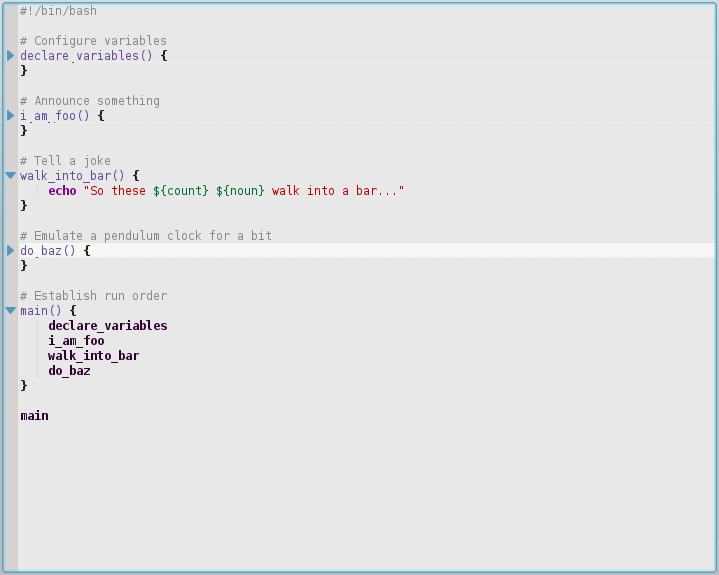
Here above you can see how it is unfolded only the walk_into_bar() function. Even of the other ones were 1000 lines long each, you could still keep under control all the code in a single page. Note it is folded even the section where you go to declare/initialize the variables.
Method 11
Another reason that is often overlooked is bash’s syntax parsing:
set -eu

echo "this shouldn't run"
{
echo "this shouldn't run either"
This script obviously contains a syntax error and bash shouldn’t run it at all, right? Wrong.
~ $ bash t1.sh
this shouldn't run
t1.sh: line 7: syntax error: unexpected end of file
If we wrapped the code in a function, this wouldn’t happen:
set -eu

main() {
  echo "this shouldn't run"
  {
  echo "this shouldn't run either"
}

main
~ $ bash t1.sh
t1.sh: line 10: syntax error: unexpected end of file
Method 12
Aside from the reasons given in other answers:
- Psychology: A programmer whose productivity is being measured in lines
of code will have an incentive to write unnecessarily verbose code.
The more management is focusing on lines of code, the more incentive
the programmer has to expand his code with unneeded complexity. This
is undesirable since increased complexity can lead to increased cost
of maintenance and increased effort required for bug fixing.
Method 13
One of the reasons I do it:
Bash reads the script line by line (well, buffered in small chunks behind that) and runs as it reads.
If I’m editing a script while it’s running and I hit “save”, then as bash reads more of the script it will get garbage.
If I wrap everything in functions and then call main "[email protected]" at the end, it forces bash to read the entire script into memory before it starts running anything significant from it.
All methods was sourced from stackoverflow.com or stackexchange.com, is licensed under cc by-sa 2.5, cc by-sa 3.0 and cc by-sa 4.0