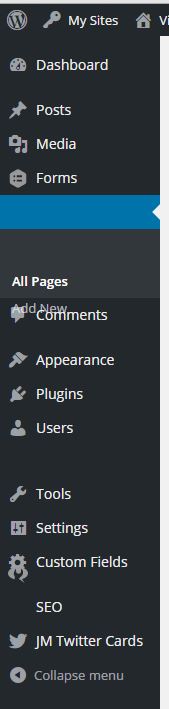
I’m having an issue with my admin menu in WordPress. As you can see in the image below the formatting of the menu is out of order. This happens whenever I first land on one of the admin pages but if I refresh the page the menu looks fine. I tried disabling my plugins but none of them seem to be causing the issue.
Answers:
Thank you for visiting the Q&A section on Magenaut. Please note that all the answers may not help you solve the issue immediately. So please treat them as advisements. If you found the post helpful (or not), leave a comment & I’ll get back to you as soon as possible.
Method 1
Otto has suggested a fix in Chrome itself until the bug is resolved:
- Go to chrome://flags/#disable-slimming-paint
- Enable the “Disable slimming paint” option.
- Ensure that the “Enable slimming paint” option below it is not turned on.
- Relaunch Chrome.
If you don’t want to take this approach you can fix this with CSS:
function chromefix_inline_css()
{
  wp_add_inline_style( 'wp-admin', '#adminmenu { transform: translateZ(0); }' );
}

add_action('admin_enqueue_scripts', 'chromefix_inline_css');
If you just want a plugin to do it: https://github.com/raffjones/chrome-admin-menu-fix
All methods was sourced from stackoverflow.com or stackexchange.com, is licensed under cc by-sa 2.5, cc by-sa 3.0 and cc by-sa 4.0