After installing FreeBSD we would like to use following commands to install additional packages.
pkg
pkg install nano
pkg install xorg
pkg install mate-desktop mate
pkg install slim
The above commands require an Internet connection to install packages. But how can we install those packages without an Internet connection by using CD/DVD/USB?
Answers:
Thank you for visiting the Q&A section on Magenaut. Please note that all the answers may not help you solve the issue immediately. So please treat them as advisements. If you found the post helpful (or not), leave a comment & I’ll get back to you as soon as possible.
Method 1
I’m not sure what release you’re using, but I’m assuming 10.1, currently the latest. The installation process is described in the 10.1-RELEASE errata:
-
Create a
/distdirectory and mount the DVD.# mkdir -p /dist # mount -t cd9660 /dev/cd0 /dist
-
Make sure
REPOS_DIRis correctly pointing to your local repository.# export REPOS_DIR=/dist/packages/repos
or for
csh:# setenv REPOS_DIR /dist/packages/repos
-
Bootstrap
pkgand install packages.# pkg bootstrap # pkg install xorg-server xorg gnome2 [...]
Method 2
Just to share my observation on this:
On FreeBSD 11.1, I run $ sudo bsdconfig and go to packages menu item. Then I select the first item which is CD/DVD. Then I select cd0 as my device, but I receive the following error:
No pkg(8) database found!
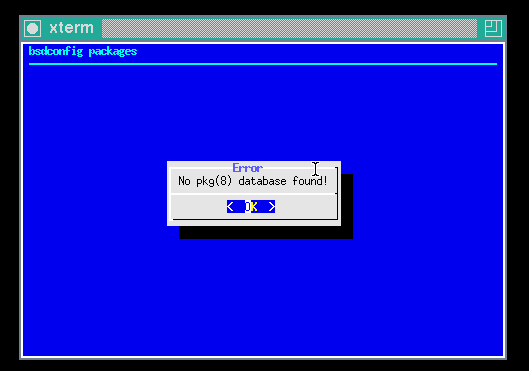
However, the procedure suggested by @mjturner works fine.
All methods was sourced from stackoverflow.com or stackexchange.com, is licensed under cc by-sa 2.5, cc by-sa 3.0 and cc by-sa 4.0