I’m running Debian Jessie (8.3) with the following pulseaudio packages. As far as I know all sound related stuff (including pulseaudio) corresponds to the default Jessie packages. I have not customized anything. Nor have I done anything with systemd, which I know nothing about.
dpkg -l | grep pulseaudio
ii  gstreamer1.0-pulseaudio:amd64    1.4.4-2               amd64                 GStreamer plugin for PulseAudio
ii  pulseaudio                       5.0-13                amd64                 PulseAudio sound server
ii  pulseaudio-esound-compat         5.0-13                amd64                 PulseAudio ESD compatibility layer
ii  pulseaudio-module-gconf          5.0-13                amd64                 GConf module for PulseAudio sound server
ii  pulseaudio-module-x11            5.0-13                amd64                 X11 module for PulseAudio sound server
ii  pulseaudio-utils                 5.0-13                amd64                 Command line tools for the PulseAudio sound server
I just replaced my old Sound Blaster Live! card with a newer Asus Xonar DX card. The sound works, but the mike doesn’t. Additionally, I have problems with pulseaudio. The pulseaudio problems (at least in part) precede the replacement of the card, but I think I need to solve them first, before figuring out the mike issue. So, this question is just about the Pulseaudio issues.
Till I rebooted today after the reinstallation of the new sound card, pavucontrol was working, at least, though pacmd has been erroring out for some time.
This appears in part to be some kind of permission issue, but I don’t know what. I’ve not made any manual changes to pulseaudio or anything else sound related, aside from adding my user to both the pulse and pulse-connect groups. I didn’t think it would make any difference, and I haven’t noticed any.
I’m adding the output from various commands below to illustrate the problem, both as root and user. Commands preceded by$ represent commands run by the user, and commands preceded by # represent commands run by root, as per standard convention.
$ pulseaudio -vv
I: [pulseaudio] main.c: setrlimit(RLIMIT_NICE, (31, 31)) failed: Operation not permitted
I: [pulseaudio] main.c: setrlimit(RLIMIT_RTPRIO, (9, 9)) failed: Operation not permitted
D: [pulseaudio] core-rtclock.c: Timer slack is set to 50 us.
D: [pulseaudio] core-util.c: RealtimeKit worked.
I: [pulseaudio] core-util.c: Successfully gained nice level -11.
I: [pulseaudio] main.c: This is PulseAudio 5.0
D: [pulseaudio] main.c: Compilation host: x86_64-pc-linux-gnu
D: [pulseaudio] main.c: Compilation CFLAGS: -g -O2 -fstack-protector-strong -Wformat -Werror=format-security -Wall -W -Wextra -pipe -Wno-long-long -Wno-overlength-strings -Wunsafe-loop-optimizations -Wundef -Wformat=2 -Wlogical-op -Wsign-compare -Wformat-security -Wmissing-include-dirs -Wformat-nonliteral -Wpointer-arith -Winit-self -Wdeclaration-after-statement -Wfloat-equal -Wmissing-prototypes -Wredundant-decls -Wmissing-declarations -Wmissing-noreturn -Wshadow -Wendif-labels -Wcast-align -Wstrict-aliasing -Wwrite-strings -Wno-unused-parameter -ffast-math -fno-common -fdiagnostics-show-option
D: [pulseaudio] main.c: Running on host: Linux x86_64 3.16.0-4-amd64 #1 SMP Debian 3.16.7-ckt20-1+deb8u3 (2016-01-17)
D: [pulseaudio] main.c: Found 6 CPUs.
I: [pulseaudio] main.c: Page size is 4096 bytes
D: [pulseaudio] main.c: Compiled with Valgrind support: no
D: [pulseaudio] main.c: Running in valgrind mode: no
D: [pulseaudio] main.c: Running in VM: no
D: [pulseaudio] main.c: Optimized build: yes
D: [pulseaudio] main.c: FASTPATH defined, only fast path asserts disabled.
I: [pulseaudio] main.c: Machine ID is 501a8b6f724c87677a6f6bb351f93f66.
I: [pulseaudio] main.c: Session ID is 55.
E: [pulseaudio] core-util.c: Failed to create secure directory (/run/user/1000/pulse): Permission denied
The output as root for this command was the same.
$ pacmd
Failed to create secure directory (/run/user/1000/pulse): Permission denied
No PulseAudio daemon running, or not running as session daemon

# pacmd
Daemon not responding.
Pavucontrol gives (first, on the terminal)
$ pavucontrol
Failed to create secure directory (/run/user/1000/pulse): Permission denied
Failed to create secure directory (/run/user/1000/pulse): Permission denied
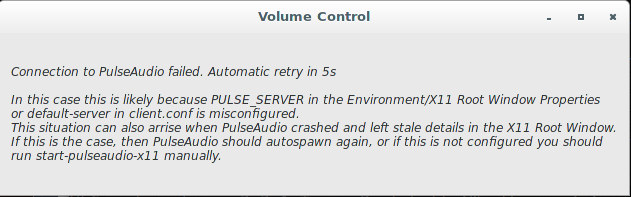
And the following box pops up. (This graphic was swiped from terdon’s Pulseaudio broken on Arch: pa_stream_writable_size() failed: Connection terminated, since it’s exactly the same as what I see.)
On root
# pavucontrol

[A popup box appears with]
Establishing connection to PulseAudio. Please wait.
find doesn’t find any hits for “ulse” in the ~/.config directory.
~/.config$ find . -name '*ulse*'
returns nothing.
Pulseaudio appears to be running
# ps aux | grep pulse
faheem    5057  0.1  0.0 376208 10432 ?        S<l  13:54   0:35 /usr/bin/pulseaudio --start --log-target=syslog
faheem    5065  0.0  0.0 122904  5164 ?        S    13:54   0:00 /usr/lib/pulseaudio/pulse/gconf-helper
as does systemd.
# ps aux | grep systemd
root       273  0.0  0.0  33092  6864 ?        Ss   13:50   0:00 /lib/systemd/systemd-journald
root       290  0.0  0.0  41644  3864 ?        Ss   13:50   0:00 /lib/systemd/systemd-udevd
root      1067  0.0  0.0  28268  2968 ?        Ss   13:50   0:00 /lib/systemd/systemd-logind
message+  1100  0.0  0.0  43160  4432 ?        Ss   13:50   0:00 /usr/bin/dbus-daemon --system --address=systemd: --nofork --nopidfile --systemd-activation
faheem    4435  0.0  0.0  36432  4544 ?        Ss   13:51   0:00 /lib/systemd/systemd --user
The permissions of the files in /run/user/1000/pulse are:
/run/user/1000/pulse# ls -laR
.:
total 4
drwx------ 2 root   root    80 Feb 22 13:54 .
drwx------ 6 faheem faheem 120 Feb 22 13:54 ..
srwxrwxrwx 1 faheem faheem   0 Feb 22 13:54 native
-rw------- 1 faheem faheem   5 Feb 22 13:54 pid
Answers:
Thank you for visiting the Q&A section on Magenaut. Please note that all the answers may not help you solve the issue immediately. So please treat them as advisements. If you found the post helpful (or not), leave a comment & I’ll get back to you as soon as possible.
Method 1
This problem appears to have been caused by running some Pulseaudio command as root. This apparently changed the permissions in /run/user/1000/pulse. Rebooting fixed the issue.
These are now
$ ls  -lah /run/user/1000/pulse/
total 4.0K
drwx------ 2 faheem faheem 100 Feb 22 21:50 .
drwx------ 6 faheem faheem 120 Feb 22 21:41 ..
srwxrwxrwx 1 faheem faheem   0 Feb 22 21:50 cli
srwxrwxrwx 1 faheem faheem   0 Feb 22 21:41 native
-rw------- 1 faheem faheem   5 Feb 22 21:41 pid
Note the difference from the result that appears in my question:
/run/user/1000/pulse# ls -laR
.:
total 4
drwx------ 2 root   root    80 Feb 22 13:54 .
drwx------ 6 faheem faheem 120 Feb 22 13:54 ..
srwxrwxrwx 1 faheem faheem   0 Feb 22 13:54 native
-rw------- 1 faheem faheem   5 Feb 22 13:54 pid
I.e. /run/user/1000/pulse is owned by root there.
But if this is broken so easily, it seems overly fragile.
All methods was sourced from stackoverflow.com or stackexchange.com, is licensed under cc by-sa 2.5, cc by-sa 3.0 and cc by-sa 4.0