I have an app in which I post some JSON data to my server and then create an object that will later be added to a database.This is done by the “Save” method in my “SendItemsController”:
 [Route("SendItems/Save")]
    [ApiController]
    public class SendItemsController : Controller
    {
        private AppDbContext _db;


        public SendItemsController(AppDbContext db)
        {
            _db = db;
        }
        [HttpPost]
        [Consumes("application/json")]
        public async Task<IActionResult> Save([FromBody] ShoppingCart s)
        {
           await _db.ShoppingCarts.AddAsync(s);
           await _db.SaveChangesAsync();
            return RedirectToAction("Index");
        }
        [HttpGet("~/ThankYou/Index")]
        public IActionResult Index()
        {
            return View();
        }

    }
After the object is added to the database I try to redirect the client to a “ThankYou” page.
When first launched when I press my order button on the “Cart” page it redirects the client to the “ThankYou” page without firing the “Save” method, but if I go back from the “ThankYou” page to the “Cart” page and hit the button again, the method is fired, the object is added to the database and the client is redirected to the “ThankYou” page, just as it should.My question is what should I change to my code in order to make it fire from the first time, not after going back and hitting the order button again.
I will provide the code that I have written.
Here is the javascript that I use in order to form my JSON object and then POST it to my server:
 var orderB = document.getElementById("orderB");
        orderB.addEventListener("click", function () {

            var inputName = document.getElementById("inputName").value;
            var inputAddress = document.getElementById("inputAddress").value;
            var inputMail = document.getElementById("inputMail").value;
            var auxArray = [];
            for (var i = 0; i < productsAux.length; i++) {
                if (productsAux[i]!="") {
                auxArray[i-1] = { "productName": productsAux[i].titlu, "productPrice": productsAux[i].pret, "quantity": localStorage.getItem(productsAux[i].titlu) };
                }
            }
            var shoppingCart = {
                productList: auxArray,
                clientName: inputName,
                clientAddress: inputAddress,
                clientMail: inputMail
            };

            $.ajax({
                type: "POST",
                data: JSON.stringify(shoppingCart),
                url: "senditems/save",
                contentType: "application/json;charset=utf-8",

            })

        })
And here is the html for my form that I use to gather the name,address and email from the client :
    <div class="form-group row">
        <div class="col-4">
            <label id="clientName"></label>
        </div>
        <div class="col-6">
            <input  id="inputName" type="text" />
        </div>
    </div>

    <div class="form-group row">
        <div class="col-4">
            <label id="clientAddress"></label>
        </div>
        <div class="col-6">
            <input  id="inputAddress" type="text" />
        </div>

    </div>

    <div class="form-group row">
        <div class="col-4">
            <label id="clientMail"></label>
        </div>
        <div class="col-6">
            <input  id="inputMail" type="text" />
        </div>
    </div>


    <div class="form-group row">
        <div class="col-3 offset-4">
            <button  class="btn btn-primary " id="orderB" asp-controller="SendItems" action="Save">ORDER</button>
        </div>
    </div>
</form>
Answers:
Thank you for visiting the Q&A section on Magenaut. Please note that all the answers may not help you solve the issue immediately. So please treat them as advisements. If you found the post helpful (or not), leave a comment & I’ll get back to you as soon as possible.
Method 1
Firstly,I am not sure if you have provided the whole ajax,because an ajax requested action will not let you redirect in the backend.You could only redirect it in your ajax function.
Secondly,you have added the onclick event,no need to add asp-controller tag helper it would render wrong formaction.
Thirdly,the item i starts with 0 but the index of auxArray starts with -1,the product array may not pass to the backend successfully.
At last,the ajax url should be:/senditems/save.
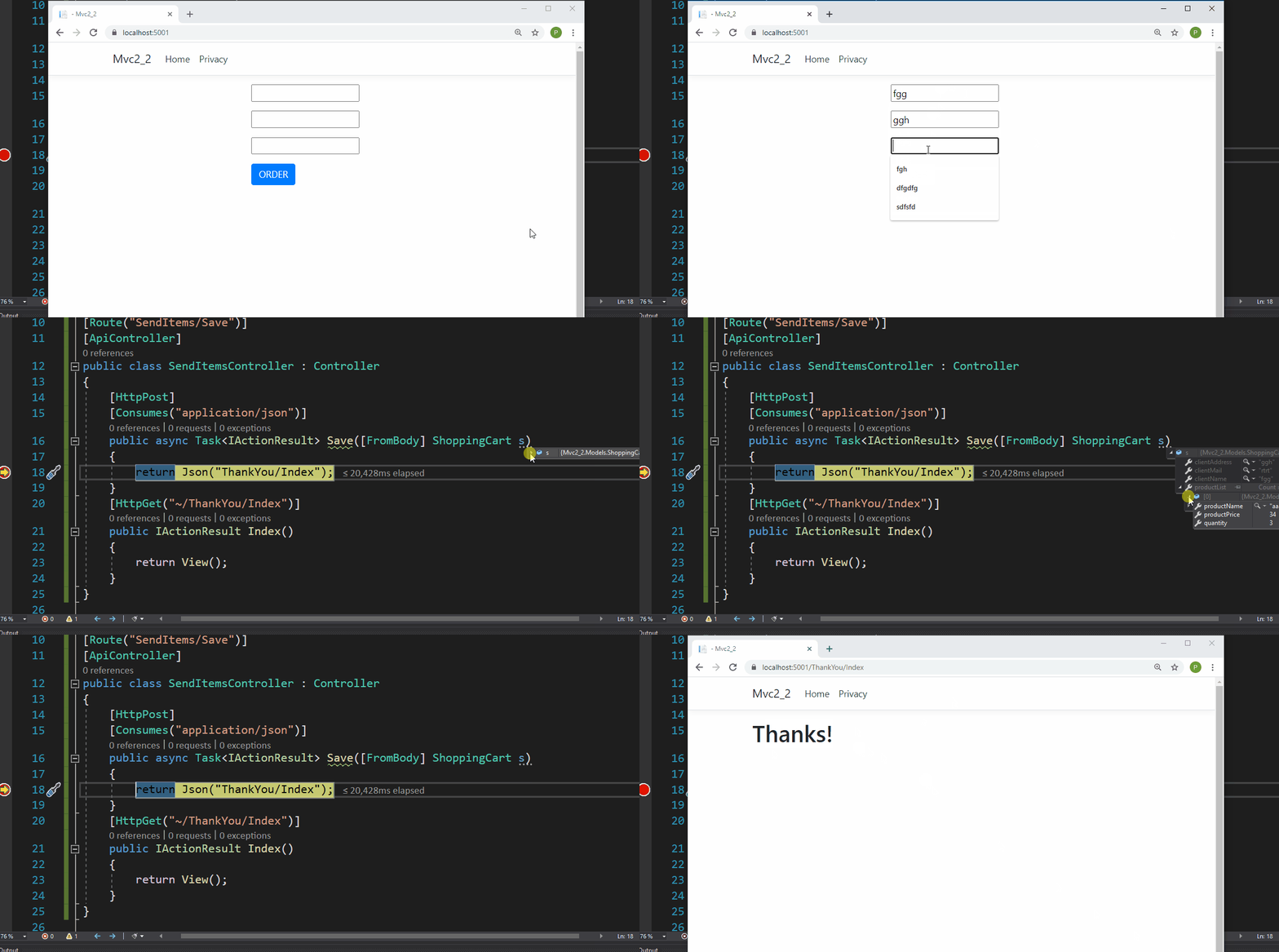
Here is a working demo like below:
Model:
public class ShoppingCart
{
    public string clientName { get; set; }
    public string clientAddress { get; set; }
    public string clientMail { get; set; }
    public List<Product> productList { get; set; }
}
public class Product
{
    public string productName { get; set; }
    public int productPrice { get; set; }
    public int quantity { get; set; }
}
View:
<form>
    //....
    <div class="form-group row">
        <div class="col-3 offset-4">
            <button class="btn btn-primary" id="orderB" type="button">ORDER</button>
        </div>
    </div>
</form>
@section Scripts
{
    <script>
        var orderB = document.getElementById("orderB");
        orderB.addEventListener("click", function () {
            var inputName = document.getElementById("inputName").value;
            var inputAddress = document.getElementById("inputAddress").value;
            var inputMail = document.getElementById("inputMail").value;
            var auxArray = [];
            for (var i = 0; i < 1; i++) {
                auxArray[i] = { "productName": "aaaa", "productPrice": 34, "quantity": 3 };
            }
            var shoppingCart = {
                productList: auxArray,
                clientName: inputName,
                clientAddress: inputAddress,
                clientMail: inputMail
            };
            $.ajax({
                type: "POST",
                data: JSON.stringify(shoppingCart),
                url: "/senditems/save",  //add `/`
                contentType: "application/json;charset=utf-8",
                success: function (res) {
                    window.location.href = res; //redirect like this
                }
            })

        })
    </script>
}
Controller:
[Route("SendItems/Save")]
[ApiController]
public class SendItemsController : Controller
{
    [HttpPost]
    [Consumes("application/json")]
    public async Task<IActionResult> Save([FromBody] ShoppingCart s)
    {
        return Json("YourRedirectUrl");
    }
}
Result:
All methods was sourced from stackoverflow.com or stackexchange.com, is licensed under cc by-sa 2.5, cc by-sa 3.0 and cc by-sa 4.0