I was randomly/experimentally pressing buttons while playing a video with mplayer. Something I did caused the video to mute. I then exited the video and tried a different one, but that one was muted too. I didn’t think that mplayer saved its settings across invocations, except for the settings in .mplayer, and I certainly did not save any settings in there, nor do I see anything in there now that could be causing this.
vlc and xine both still have sound, so it appears this problem is specific to mplayer.
Any idea what the problem is? Rebooting will most likely fix it, and I’ll do this if there is no option, but I’d like to know what the problem is for future reference.
Answers:
Thank you for visiting the Q&A section on Magenaut. Please note that all the answers may not help you solve the issue immediately. So please treat them as advisements. If you found the post helpful (or not), leave a comment & I’ll get back to you as soon as possible.
Method 1
It looks to be in this config file, at least according to this SU Q&A titled: get mplayer to start with a default volume other than 25%.
~/.mplayer/config
To override the muted option you can press the numeric keys, 9 & 0. These will decrease/increase the volume. I believe the m key will toggle the muted sound too.
OK, but where is this option being saved?
This took a bit of digging but the option looks to be “saved” by Pulse Audio. Here’s how I came to this conclusion. You can run mplayer in a more verbose mode like so:
$ mplayer -msglevel all=6 Whats-the-issue-dear.mp3 2>&1 | tee mpl.log
Looking through the resulting log file I noticed these lines:
Searching demuxer type for filename /home/saml/Whats-the-issue-dear.mp3 ext: .mp3
Trying demuxer 17 based on filename extension
==> Found audio stream: 0
demux_audio: seeking from 0xC0A1 to start pos 0x0
demux_audio: audio data 0x0 - 0xC0A7··
Audio only file format detected.
Load subtitles in /home/saml/
get_path('sub/') -> '/home/saml/.mplayer/sub/'
In particular this line makes me think that perhaps Pulse Audio or something else is doing this on behalf of mplayer.
==> Found audio stream: 0
If you launch the sound settings dialog while playing audio where the volume is turned all the way down you’ll see these icons in that dialog, for example:
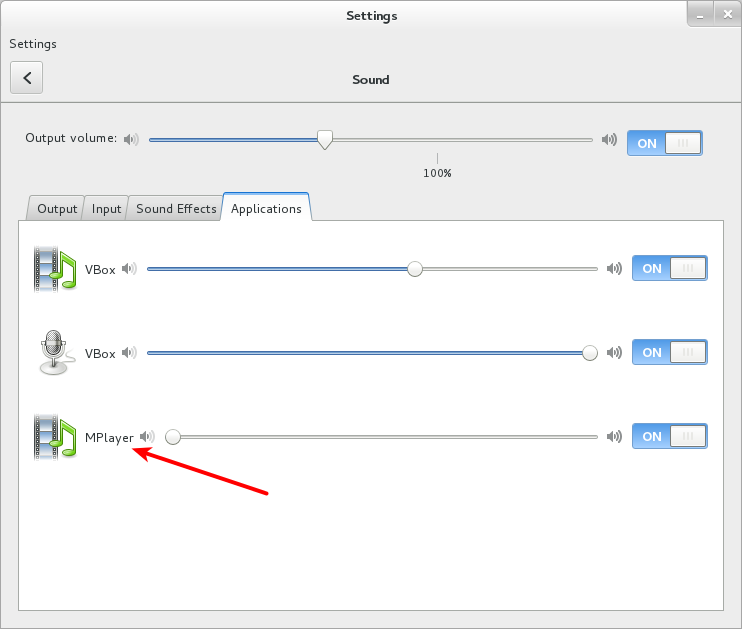
NOTE: To launch the sound settings dialog, gnome-control-center sound.
So this would seem to indicate my hunch was correct. If you make use of the Pulse Audio control tool, pactl, you can see a bit more. Here are all the Pulse Audio clients:
$ pactl list short clients
0   module-systemd-login.c  (null)
4   module-x11-xsmp.c   (null)
5   protocol-native.c   gnome-settings-daemon
9   protocol-native.c   python2.7
11  protocol-native.c   gnome-settings-daemon
13  protocol-native.c   thunderbird
125 protocol-native.c   gnome-settings-daemon
243 module-systemd-login.c  (null)
311 protocol-native.c   chrome
331 protocol-native.c   gnome-shell
332 protocol-native.c   gnome-shell
335 protocol-native.c   VirtualBox
369 protocol-native.c   mplayer
375 protocol-native.c   pactl
Number 369, mplayer, is our guy. We can interrogate the inputs like so:
$ pactl list sink-inputs
...
Sink Input #6203
    Driver: protocol-native.c
    Owner Module: 9
    Client: 369
    Sink: 0
    Sample Specification: s16le 2ch 44100Hz
    Channel Map: front-left,front-right
    Format: pcm, format.sample_format = ""s16le""  format.rate = "44100"  format.channels = "2"  format.channel_map = ""front-left,front-right""
    Corked: yes
    Mute: no
    Volume: 0:   0% 1:   0%
            0: -inf dB 1: -inf dB
            balance 0.00
    Buffer Latency: 276916 usec
    Sink Latency: 0 usec
    Resample method: n/a
    Properties:
        media.name = "audio stream"
        application.name = "MPlayer"
        native-protocol.peer = "UNIX socket client"
        native-protocol.version = "27"
        application.process.id = "23956"
        application.process.user = "saml"
        application.process.host = "greeneggs.bubba.net"
        application.process.binary = "mplayer"
        application.language = "C"
        window.x11.display = ":0"
        application.process.machine_id = "0ee868f8b7da40f48013a281826b1b84"
        application.process.session_id = "1"
        module-stream-restore.id = "sink-input-by-application-name:MPlayer"
Notice these lines?
Volume: 0:   0% 1:   0%
        0: -inf dB 1: -inf dB
        balance 0.00
The volume is set here to 0. This is what’s causing mplayer‘s volume to remain turned down from run to run.
Alternative Sound Setting GUI
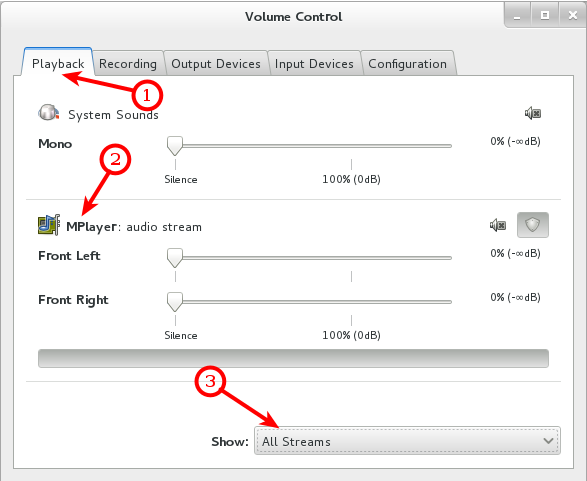
You can also make use of other GUIs to manage Pulse Audio such as pavucontrol. It should be in the standard repos for your distro if it isn’t already installed.
$ pavucontrol
Method 2
from man mplayer
m is used to mute sound
9 - 0 is used to Decrease/Increase volume
All methods was sourced from stackoverflow.com or stackexchange.com, is licensed under cc by-sa 2.5, cc by-sa 3.0 and cc by-sa 4.0