C# Asp.net Css class in code behind does not work when app is published
I’m quite new to the ASP.net Framework Webapps enviroment, and came accross an issue.
I’m quite new to the ASP.net Framework Webapps enviroment, and came accross an issue.
I want to have my ASP.NET C# textbox to span the entire width of the div and be responsive. Also, I am using Bootstrap 4 if there is an option with that.
So, I have a web form in asp.net. On that web form, there is a GridView. When the user clicks the view details on gridview, I want a modal popup to show the list of stores in that category. I have been trying different stuff but the modal does not show up. Below is my code for front end:
Good morning, I tell you, I am working on a shopping site with Bootstrap 4 as much as possible, which I want to show the products in this way, I leave an example: https://mdbootstrap.com/snippets/jquery/ascensus/135508
I’m trying to generate an accordion dynamically using bootstrap and ASP.NET Core.
The goal is to show all terms which belong to a certain category but the problem is that only the first two out of four categories are expanding/collapsing. I can see, that each card-header and card-body is available in the DOM.
My code looks like this:
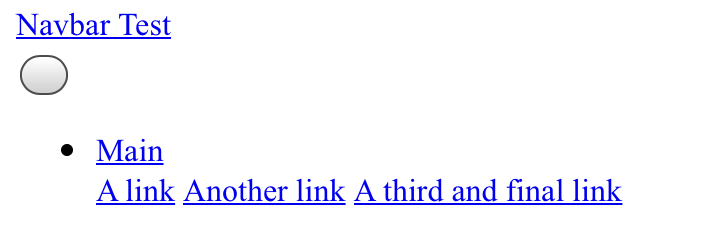
When I try to load a dropdown list in a Bootstrap navbar on an ASP.NET page, the desktop version of the list loads exactly as it appears on the official navbar documentation, but not when loading the same page on an iPad Air 2 with iOS 13.3.1. Instead of loading the listed items in a dropdown fashion, they appear below the dropdown menu’s name. Just as well, the toggle “hamburger” button appears as a blank button.