I’m using tmux 2.1 and tried to on mouse mode with
set -g mouse on
And it works fine, I can switch across tmux window splits by clicking the appropriate window. But the downside of this is that I cannot select text with mouse. Here is how it looks like:
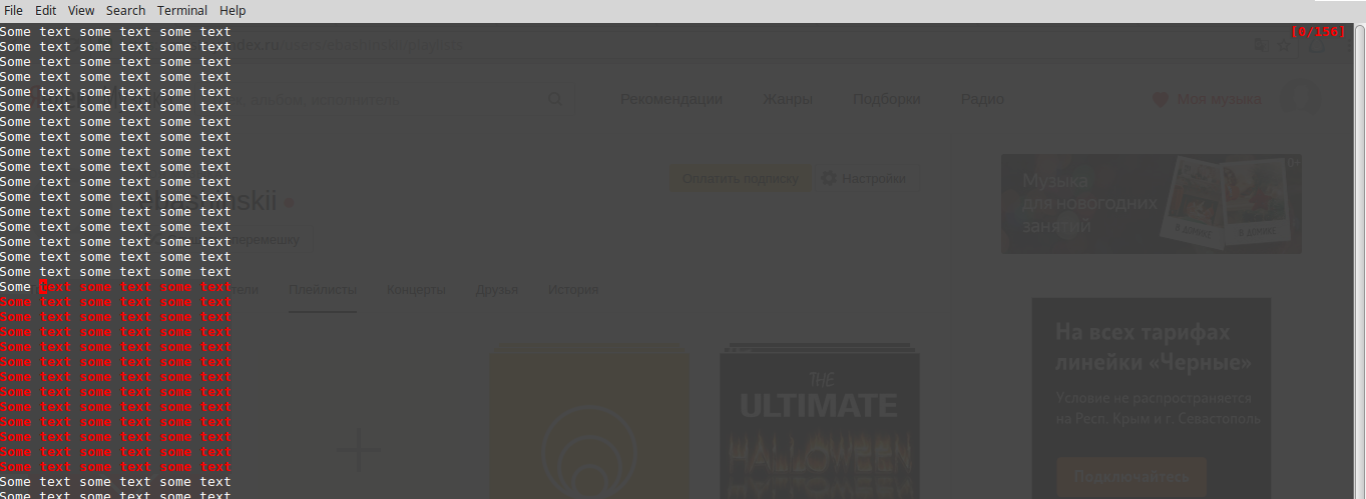
As you can see, the selection just become red when I keep pressing the mouse button and disappear when I release the button. Without mouse mode enabled the “selection with mouse” works completely fine.
Is there some workaround to turn mouse mode on and have the ability to select text?
Answers:
Thank you for visiting the Q&A section on Magenaut. Please note that all the answers may not help you solve the issue immediately. So please treat them as advisements. If you found the post helpful (or not), leave a comment & I’ll get back to you as soon as possible.
Method 1
If you press Shift while doing things with the mouse, that overrides the mouse protocol and lets you select/paste. It’s documented in the xterm manual for instance, and most terminal emulators copy that behavior.
Notes for OS X: In iTerm, use Option instead of Shift.
In Terminal.app, use Fn.
Method 2
Thomas Dickey’s answer is probably what most people are looking for.
To give some more context on the behavior you are observing, when tmux‘s mouse mode is on it enables text selection within a particular pane. That’s the red text highlighting shown in your screenshot. It can be useful when you have split panes and want to only copy text within one.
When you release the mouse button the selected text is copied to tmux‘s internal clipboard. You can then paste that text using Ctrl+B ].
Unfortunately it does not copy to the system’s primary clipboard, so you can’t select in tmux and then paste into a browser for instance. You can configure that behavior though. See this answer to How to copy and paste with a mouse with tmux.
Method 3
I had a similar issue where mouse click and drag (tmux-yank) stopped working on MacOS, try Cmd+R
All methods was sourced from stackoverflow.com or stackexchange.com, is licensed under cc by-sa 2.5, cc by-sa 3.0 and cc by-sa 4.0