I have a set of nice wireless headphones which I use from time to time, in addition to my speakers and normal microphone.
I’d like to write a script to switch between one input and output source and another, essentially a switch between my headphones and my speakers+microphone.
I’d like to change between this:
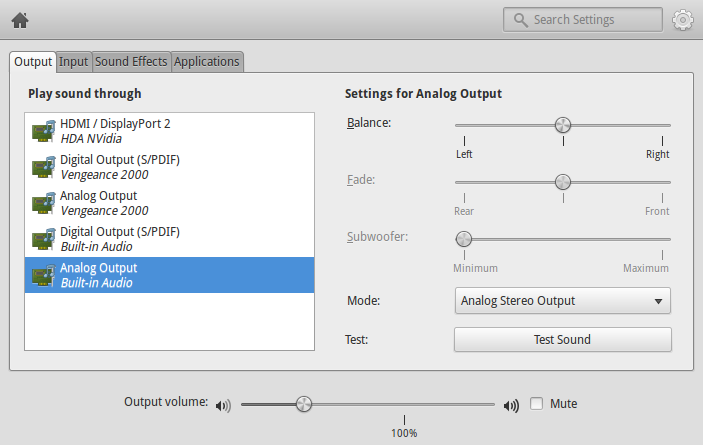
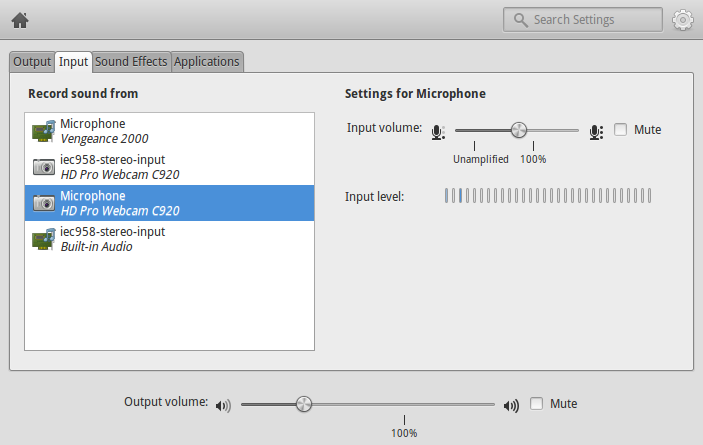
…and this:
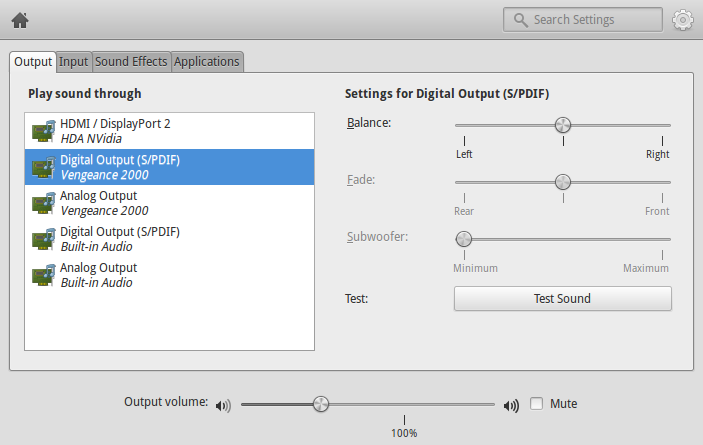
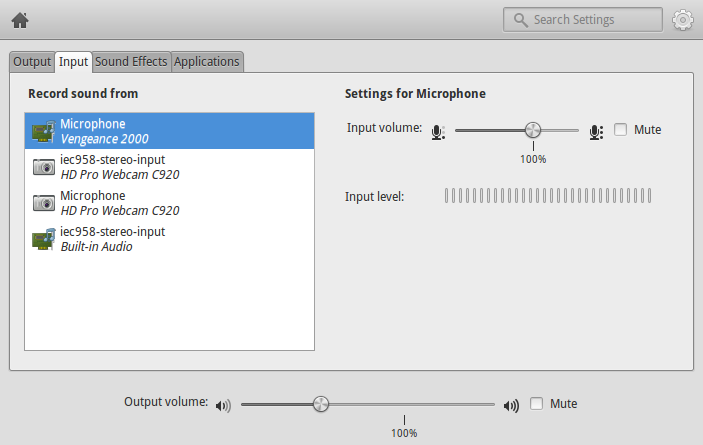
Is there a way for me script a transfer between the two inputs and outputs? Essentially I’m looking for something like this:
CURRENT_INPUT="$(get-current-input-name)"
CURRENT_OUTPUT="$(get-current-output-name)"

if [ "$CURRENT_INPUT" == "Vengeance 2000" ]; then
    set-current-input "HD Pro Webcam C920"
else
    set-current-input "Vengeance 2000"
fi

if ["$CURRENT_OUTPUT" == "Vengeance 2000" ]; then
    set-current-output "Built-in Audio"
else
    set-current-output "Vengeance 2000"
fi
Is there a way to script this?
Answers:
Thank you for visiting the Q&A section on Magenaut. Please note that all the answers may not help you solve the issue immediately. So please treat them as advisements. If you found the post helpful (or not), leave a comment & I’ll get back to you as soon as possible.
Method 1
As @Teresa-e-Junior pointed out pactl is the tool to use:
First of all we might want to get the IDs of our PA sinks. On my system this is what I get:
$ pactl list short sinks
0       alsa_output.pci-0000_01_00.1.hdmi-surround      module-alsa-card.c      s16le 6ch 44100Hz  SUSPENDED
1       alsa_output.pci-0000_00_1b.0.analog-stereo      module-alsa-card.c      s16le 2ch 44100Hz  RUNNING
Sink 1 is currently my default sink.
But now I want all my current and future streams to be played via HDMI (i.e. sink 0).
There is a command to set the default sink for PulseAudio, but it doesn’t seem to have any effect on my PC:
$ pacmd set-default-sink 0 #doesn't work on my PC :(
Instead, new streams seem to be connected to the sink that had a stream moved to it most recently.
So let’s tell pactl to move all currently playing streams to sink 0.
We’ll first need to list them:
$ pactl list short sink-inputs
290     1       176     protocol-native.c       float32le 2ch 44100Hz
295     1       195     protocol-native.c       float32le 2ch 44100Hz
Ok, we’ve got two streams (IDs 290 and 295) that are both attached to sink 1.
Let’s move them to sink 0:
$ pactl move-sink-input 290 0
$ pactl move-sink-input 295 0
So, that should be it. Now we just have to make a script that does the work for us:
#!/bin/bash

if [ -z "$1" ]; then
    echo "Usage: $0 <sinkId/sinkName>" >&2
    echo "Valid sinks:" >&2
    pactl list short sinks >&2
    exit 1
fi

newSink="$1"

pactl list short sink-inputs|while read stream; do
    streamId=$(echo $stream|cut '-d ' -f1)
    echo "moving stream $streamId"
    pactl move-sink-input "$streamId" "$newSink"
done
You can call it with either a sink ID or a sink name as parameter (i.e. either 0 or something like alsa_output.pci-0000_01_00.1.hdmi-surround).
Now you could attach this script to a udev event or key shortcut.
Method 2
The following commands can be used to manipulate the PulseAudio sound server:
pacmd - Used to reconfigure a PulseAudio sound server during runtime.
pactl - Used to control a running PulseAudio sound server.
Here are some examples of how they function:
pacmd list-sinks :: list name or index number of possible sinks
pacmd set-default-sink [sinkname] :: set the default output sink
pacmd set-default-source [sourcename] :: set the default input
pacmd set-sink-volume [index] [volume] :: set the sink volume
pacmd set-source-volume index volume :: volume control range 0 – 65536 (the lower the number the lower the volume)
These are only a few that I’ve pulled out of the wiki & man page. Reference this for more detailed information. Or you can view either commands --help or man page.
There is also a command line tool already out there that serves this purpose. It’s name is ponymix. It’s a command line mixer for PulseAudio. The link provided is to the projects github. It’s developed by a friend and fellow Arch Linux Trusted User / Developer. If you’re not running Arch you could just compile it from source using make and sudo make install.
$ ponymix --help
    usage: ponymix [options] <command>...
Options:
 -h, --help              display this help and exit
 -c, --card CARD         target card (index or name)
 -d, --device DEVICE     target device (index or name)
 -t, --devtype TYPE      device type
 -N, --notify            use libnotify to announce volume changes
     --source            alias to -t source
     --input             alais to -t source
     --sink              alias to -t sink
     --output            alias to -t sink
     --sink-input        alias to -t sink-input
     --source-output     alias to -t source-output
Device Commands:
  help                   display this message
  defaults               list default devices (default command)
  set-default            set default device by ID
  list                   list available devices
  list-short             list available devices (short form)
  list-cards             list available cards
  list-cards-short       list available cards (short form)
  get-volume             get volume for device
  set-volume VALUE       set volume for device
  get-balance            get balance for device
  set-balance VALUE      set balance for device
  adj-balance VALUE      increase or decrease balance for device
  increase VALUE         increase volume
  decrease VALUE         decrease volume
  mute                   mute device
  unmute                 unmute device
  toggle                 toggle mute
  is-muted               check if muted
Application Commands:
  move DEVICE            move target device to DEVICE
  kill DEVICE            kill target DEVICE
Card Commands:
  list-profiles          list available profiles for a card
  list-profiles-short    list available profiles for a card(short form)
  get-profile            get active profile for card
  set-profile PROFILE    set profile for a card
Method 3
On my laptop running Fedora 20, HDMI output is not listed as a sink in the default profile, but as a different profile itself.
I have only 1 sink like this, nice music playing on my laptop speakers:
$ pactl list short sinks
8   alsa_output.pci-0000_00_1b.0.analog-stereo  module-alsa-card.c  s16le 2ch 44100Hz   RUNNING
If I run pactl set-card-profile 0 output:hdmi-stereo then nice music is playing through HDMI. I get:
$ pactl list short sinks
14  alsa_output.pci-0000_00_1b.0.hdmi-stereo    module-alsa-card.c  s16le 2ch 44100Hz   RUNNING
To get back to default I just run pactl set-card-profile 0 output:analog-stereo+input:analog-stereo. Either way the default is there again if I reboot.
The list of profiles for my card is somewhere on pactl list cards output.
Method 4
Extending the accepted answer by @cinelli, I’ve come up with a script that
- toggles between exactly two sinks / output devices that have to be defined in the script,
- toggles the streams AND the default sink, so media keys on the keyboard work and
- leaves my echo cancellation module untouched.
Change as needed!
#!/bin/bash

# Small script to switch between two hardcoded sound output devices

# Set patterns for devices to be toggled. Have to match to second column
# in output of "pactl list short sinks".
# (Could also hardcode the full names, but this might be a little more robust)
TOGGLE1="Jabra_EVOLVE"
TOGGLE2="Generic_ThinkPad_Dock_USB"

# Discover which sink (output device) is active, and set up toggles
while read -r stream; do
  echo "$stream"
  if echo "$stream" | grep -q "RUNNING"; then
    currentSink=$(echo "$stream" | cut -f2)
  fi
  if echo "$stream" | grep -q "$TOGGLE1"; then
    toggle1Sink=$(echo "$stream" | cut -f2)
  fi
  if echo "$stream" | grep -q "$TOGGLE2"; then
    toggle2Sink=$(echo "$stream" | cut -f2)
  fi
done < <(pactl list short sinks)

# Set up where to switch to
if [ "$currentSink" = "$toggle1Sink" ]; then
  newSink=$toggle2Sink
else
  newSink=$toggle1Sink
fi

# Switch streams AND default sink
pactl list short sink-inputs|while read -r stream; do
    streamId=$(echo "$stream"|cut '-d ' -f1)
    # exclude echo cancellation module, but switch all other streams
    # You can, but don't have to remove if condition if no such module present
    if [ "$streamId" != "0" ]; then
      echo "moving stream $streamId"
      pactl move-sink-input "$streamId" "$newSink"
    fi;
    # Also switch default sink, so media control keys work correctly
    pactl set-default-sink "$newSink"
done
Method 5
I could not comment since this is a new account but I added some code on @mreithub’s answer and made it so that it cycles through audio outputs automatically.
#!/bin/bash
BACKGROUND_RED="`tput setaf 1` "
$BACKGROUND_WHITE="`tput setaf 6` "
FORGROUND_BLACK="`tput setaf 0` "
DIM="`tput dim` "
INVERT="`tput smso`"
BOLD="`tput bold` "
RESET="`tput sgr0` "
CLEAR="`tput clear` "

echo -e "$CLEAR"
pactl list short sinks >&2
# ------------------------------------

if [ -z "$1" ]; then
   echo -en "Usage: $0 <sinkId/sinkName>" >&2
   echo -en "Valid sinks:" >&2
   exit 1
fi

if [ "$1" == '-' ]; then
   echo -en "$INVERT$BACKGROUND_WHITE Current sink : $RESET    " >&2
   currentSink=$(pactl list short sinks | grep RUNNING | awk '{print $1}' | head -1)
   if [ -e $currentSink ];then
       currentSink=$(pactl list short sinks | awk '{print $1}' | head -1)
   fi
   pactl list short sinks | grep "^$currentSink" | awk '{print $1,$2}' >&2
   sinks=( $(pactl list short sinks | awk '{print $1}') )
   for (( index=0; index <= (${#sinks[@]} * 2); index++ )); do
       if [ "${sinks[$((index % ${#sinks[@]}))]}" == "$currentSink" ]; then
           newSink="${sinks[$((++index % ${#sinks[@]}))]}"
           break
       fi
   done
else
   newSink="$1"
fi
   echo "-_-_-_-_-_-_-_-_-_-_-_-_-_-_-_-_-_-_-_-_-_-_-_-_"
   echo -en "$INVERT$BACKGROUND_RED New sink : $RESET     "
   pactl list short sinks | grep --color "^$newSink" | awk '{print $1,$2}' >&2

pacmd set-default-sink "$newSink" >&2

pactl list short sink-inputs|while read stream; do
   streamId=$(echo -en $stream|cut '-d ' -f1)
   echo -e "$FORGROUND_BLACK$DIM moving stream $streamId $RESET" >&2
   pactl move-sink-input "$streamId" "$newSink" >&2
done
Method 6
It appears to be much simpler now on Ubuntu 22.04. No need to change PulseAudio’s configuration or to move active streams.
Here is just what is necessary for me to switch from the speakers and microphone of my computer, to the ones of my headset:
#!/bin/bash

if [ "$(pactl get-default-sink)" = "alsa_output...<first-device-speaker>" ]; then
    pactl set-default-sink "alsa_output...<second-device-speaker>"
    pactl set-default-source "alsa_input...<second-device-microphone>"
else
    pactl set-default-sink "alsa_output...<first-device-speaker>"
    pactl set-default-source "alsa_input...<first-device-microphone>"
fi
I assigned a keyboard shortcut to this script, and I can switch from one device to another easily. Active streams switch instantly.
To get the list of available sinks and sources:
pactl list short sinkspactl list short sources
All methods was sourced from stackoverflow.com or stackexchange.com, is licensed under cc by-sa 2.5, cc by-sa 3.0 and cc by-sa 4.0