My desktop is usually very responsive, even under heavy load. But when I copy files to a USB drive, it always locks up after some time. By “lock up”, I mean:
- Moving focus from one window to another can take 10-20s
- Switching desktops can take 10-20s
- Videos don’t update anymore (in YouTube, the audio continues to play, only the video freezes)
The system load isn’t exceptionally high when this happens. Sometimes, I see a lot of white on xosview indicating that the kernel is busy somewhere.
At first glance, it looks as if copying files to the USB drive would interfere somehow with compiz but I can’t imagine what the connection could be.
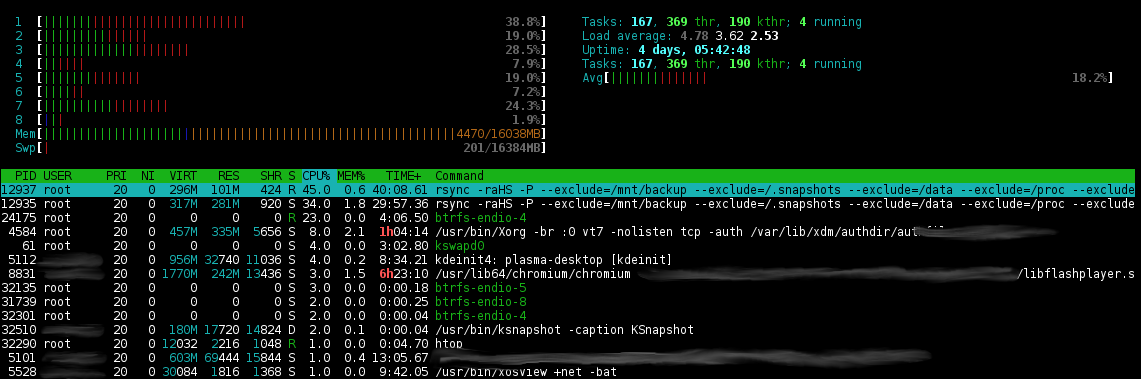
Here is the output of htop:
Here is the output of iostat -c -z -t -x -d 1 during a 2 minute hang:
19.07.2012 20:38:22
avg-cpu:  %user   %nice %system %iowait  %steal   %idle
           1,27    0,00    0,38   37,52    0,00   60,84

Device:         rrqm/s   wrqm/s     r/s     w/s    rkB/s    wkB/s avgrq-sz avgqu-sz   await r_await w_await  svctm  %util
sdg               0,00     2,00    0,00  216,00     0,00 109248,00  1011,56   247,75  677,69    0,00  677,69   4,63 100,00
As you can see, only the external harddisk is active. Here is the complete log: http://pastebin.com/YNWTAkh4
The hang started at 20:38:01 and ended at 20:40:19.
Software information:
- openSUSE 12.1
- KDE 4.7.x
- Filesystems: reiserfs and btrfs on my internal harddisk, btrfs on the USB drive
Answers:
Thank you for visiting the Q&A section on Magenaut. Please note that all the answers may not help you solve the issue immediately. So please treat them as advisements. If you found the post helpful (or not), leave a comment & I’ll get back to you as soon as possible.
Method 1
My first guess was btrfs since the I/O processes of this file system sometimes take over. But it wouldn’t explain why X locks up.
Looking at the interrupts, I see this:
# cat /proc/interrupts
           CPU0       CPU1       CPU2       CPU3       CPU4       CPU5       CPU6       CPU7
  0:        179          0          0          0          0          0          0          0  IR-IO-APIC-edge      timer
  1:          6          0          0          0          0          0          0          0  IR-IO-APIC-edge      i8042
  8:          1          0          0          0          0          0          0          0  IR-IO-APIC-edge      rtc0
  9:          0          0          0          0          0          0          0          0  IR-IO-APIC-fasteoi   acpi
 12:         10          0          0          0          0          0          0          0  IR-IO-APIC-edge      i8042
 16:    3306384          0          0          0          0          0          0          0  IR-IO-APIC-fasteoi   ehci_hcd:usb1, nvidia, mei, eth1
Well, duh. The USB driver uses the same IRQ as the graphics card and it is first in the chain. If it locks up (because the file system does something expensive), the graphics card starves (and the network, too).
Method 2
I had seen similar problems with openSUSE 12.1’s linux-3.1 kernel and found that disabling transparent huge pages helped:
echo never > /sys/kernel/mm/transparent_hugepage/enabled
The underlying problem is that if an application allocates 4MB or more, the kernel will try to give it a huge page, for which it needs a whole contiguous 4MB RAM. Now, if there are many dirty pages around, that still need to be written to a slow USB device, it waits for that IO to finish before continuing with the memory allocation.
Method 3
As mentioned, this probably has to do with the kernel hugepages setup.
I know several people with this problem. You can find several documentation about it in the web, e.g.
- https://bbs.archlinux.org/viewtopic.php?id=112846&p=1
- http://lwn.net/Articles/467328/
- http://forum.manjaro.org/index.php?topic=2062.0
- Slow performance when copying files to and from USB devices
I have completely fixed the problem on my setup by doing the following. Notice YMMV, not all the fixes below may be necessary, and maybe they’ll not be sufficient.
I may have forgotten something to be honest. Anyhow that’s my setup and it works.
- Use linux-ck kernel
echo madvise > /sys/kernel/mm/transparent_hugepage/enabledecho never > /sys/kernel/mm/transparent_hugepage/defrag
Method 4
Change the cable. Remove oxid from usb port/cables.
All methods was sourced from stackoverflow.com or stackexchange.com, is licensed under cc by-sa 2.5, cc by-sa 3.0 and cc by-sa 4.0