I have an aspx page with a listbox control. The listbox is populated from a collection that is retrieved from a service when the page loads. When the user selects an item from the listbox the page posts back, adding the retrieved objects to the session before reloading. On the reload I use the session objects instead of having to call the service again.
This all works fine until I access the page from within an iFrame. The Session objects are not retrieved when the page is in an iFrame (Session[“blah”] is null). This code works perfectly when the page is not in an iFrame.
I am using IIS7 and windows server 2008. Is there anything I need to do in ISS to allow Session variables to be used in an iFrame? Does anyone know of anything else that may cause this to happen?
Thanks,
Neil
Answers:
Thank you for visiting the Q&A section on Magenaut. Please note that all the answers may not help you solve the issue immediately. So please treat them as advisements. If you found the post helpful (or not), leave a comment & I’ll get back to you as soon as possible.
Method 1
IE gives lower level of trust to 3rd party content loaded in an iframe. This blocks session cookies.
You can solve this by setting a P3P header in IIS:
Name = p3p
Value = CP="IDC DSP COR CURa ADMa OUR IND PHY ONL COM STA"
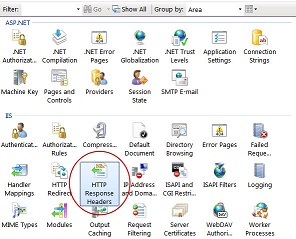

See Also
Method 2
In my case, the project was .net framework 4.6.1. I’ve upgraded to 4.7.2 version and added the key below to the web.config
<system.web>
    <sessionState cookieSameSite="None"/>
This way third party Iframe sessions starts working.
Before you do this change, it’s better to read this
https://docs.microsoft.com/en-us/aspnet/samesite/system-web-samesite
Method 3
Actually never mind, I just cleared out the files in C:WindowsMicrosoft.NETFramework64v2.0.50727Temporary ASP.NET Files and restarted IIS and it was all working
Method 4
As of 2021, Chrome (and maybe others) requires that the cookie is secured.
This can be achieved this way :
<system.web>
  <httpCookies httpOnlyCookies="true" requireSSL="true" sameSite="None" />
</system.web>
Method 5
To enable sessions in iFrames:
InterNet Options -> Privacy -> Advanced -> Check “Always Allows Session Cookies”
All methods was sourced from stackoverflow.com or stackexchange.com, is licensed under cc by-sa 2.5, cc by-sa 3.0 and cc by-sa 4.0