Format y axis as percent
I have an existing plot that was created with pandas like this:
I have an existing plot that was created with pandas like this:
In a pylab program (which could probably be a matlab program as well) I have a numpy array of numbers representing distances: d[t] is the distance at time t (and the timespan of my data is len(d) time units).
TL;DR -> How can one create a legend for a line graph in Matplotlib‘s PyPlot without creating any extra variables?
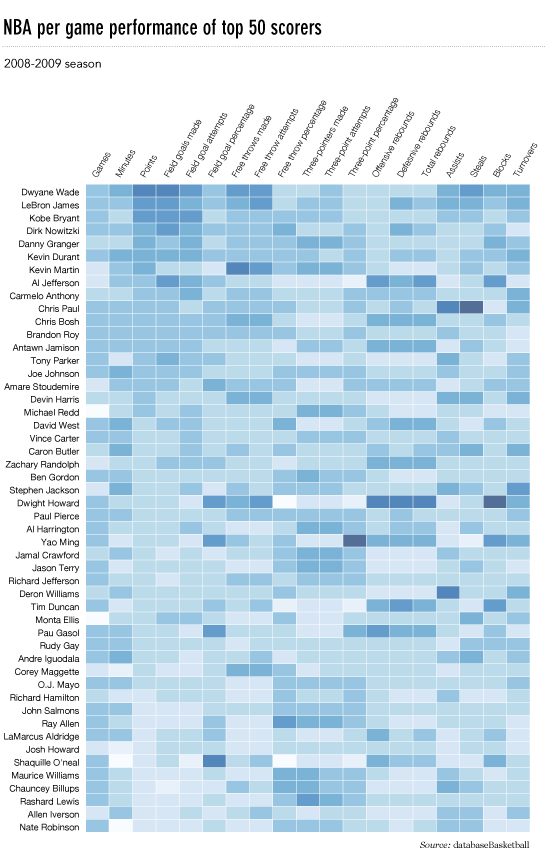
I’d like to make a heatmap like this (shown on FlowingData):
I want to use matplotlib to draw more or less the figure I attached below, which includes the two intersecting planes with the right amount of transparency indicating their relative orientations, and the circles and vectors in the two planes projected in 2D.
Check the x axis of the figure below. How can I move the labels a bit to the left so that they align with their respective ticks?
I often plot a point on a matplotlib plot with:
The following example code generates a simple plot, then saves it to ‘fig1.pdf’, then displays it, then saves it again to ‘fig2.pdf’. The first image looks as expected, but the second one is blank (contains a white square). What’s actually going on here? The line plt.show() apparently messes something up, but I can’t figure out what/how!
What is the difference between the Axes.plot() and pyplot.plot() methods? Does one use another as a subroutine?
I have a bunch of MATLAB code from my MS thesis which I now want to convert to Python (using numpy/scipy and matplotlib) and distribute as open-source. I know the similarity between MATLAB and Python scientific libraries, and converting them manually will be not more than a fortnight (provided that I work towards it every … Read more